Koby: A Decorative Display Font for Impactful Web Design
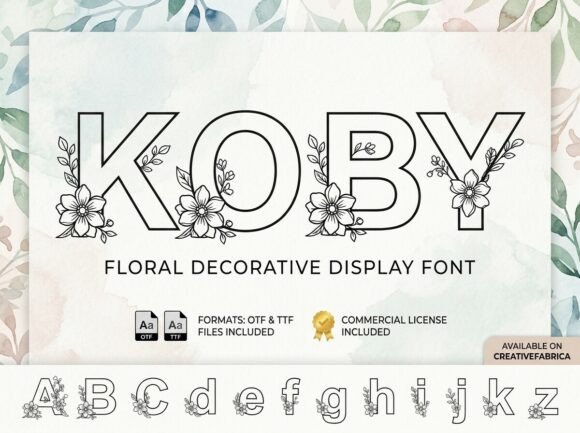
Koby is a decorative display font built for digital prominence — not background noise. As a premium font, it commands attention with bold artistic elements and a distinct visual personality that translates powerfully across websites, landing pages, app interfaces, and branded digital experiences. If you’re a web designer or UI creator choosing fonts for conversion-focused layouts, Koby delivers immediacy, tone, and memorability where it matters most: the hero section, headline hierarchy, and brand-critical touchpoints.
Koby for Hero Sections and Landing Page Headlines
Koby shines brightest in large-scale, high-impact placements — especially hero sections on SaaS landing pages, course sales sites, and boutique online stores. Its decorative structure thrives at 48px and above, delivering strong visual rhythm without sacrificing legibility on desktop or tablet. Because Koby is designed as a display font — not body text — it excels when used sparingly to anchor messaging: “Launch Your Vision,” “Handcrafted Since 2012,” or “Join the Creative Collective.” On responsive layouts, pair Koby with a clean sans serif (like Inter or Manrope) for subheads and body copy to preserve scanning speed and maintain hierarchy.
Koby for Brand Identity Systems and Digital Logo Text
When building a cohesive online identity, Koby serves as a strategic brand accent — not just decoration. Its strong visual personality makes it ideal for logo text in creative portfolios, coaching websites, editorial newsletters, and digital brand kits. Unlike generic script fonts or overused handwritten fonts, Koby’s artistic elements feel intentional and ownable. For web use, ensure your license includes WOFF2 support and test rendering across Chrome, Safari, and Firefox — especially with variable weight fallbacks if only one style is included. Use Koby exclusively for primary logo lockups or wordmarks; avoid stretching or rotating the glyphs, which can compromise its balanced proportions.
Koby for Online Store Banners and Product Launch Graphics
Koby transforms static e-commerce banners into dynamic focal points. Whether promoting a limited-edition collection on a Shopify store, announcing a new digital product on a Gumroad page, or highlighting a seasonal sale in a Mailchimp header, this decorative font adds tonal clarity fast. Its confident stance reads well over textured backgrounds or subtle image overlays — just maintain at least 70% contrast against dark or light surfaces. For mobile banners, reduce line height slightly and increase letter spacing by 2–4% to prevent crowding. Never set full paragraphs in Koby; reserve it for short, high-value phrases like “Summer Edit Live” or “Early Access Opens Friday.”
Koby for Blog Headers and Editorial Web Experiences
Bloggers and content creators using Koby for blog headers gain instant distinction in crowded feeds and newsletter previews. As a decorative font, it signals voice and perspective before a single sentence is read — ideal for design-focused publications, creative agency case studies, or personal branding blogs. Pair it with a neutral serif (e.g., Charter or Literata) for long-form readability, or a geometric sans (like Poppins) for modern editorial rhythm. Avoid using Koby for post titles under 32px on mobile — instead, switch to a robust heading font at smaller sizes while keeping Koby for featured article cards or cover graphics.
Koby for App Screens and Digital Product UI Elements
In digital product UIs — from course dashboards to creative tool onboarding flows — Koby works best as a strategic typographic punctuation mark. Think: the bold “Welcome Back” on a login screen, the celebratory “You’re All Set!” after setup, or the stylized section label “Your Projects” in a portfolio app. Its decorative nature means it must be deployed with restraint: never for navigation labels, form fields, or error messages. Always verify that your commercial font license permits embedding in web apps or PWAs — many decorative fonts restrict usage beyond static websites unless explicitly licensed for software distribution.
Koby for Social Media Graphics and Branded Content Sections
Koby scales beautifully into social-first assets: Instagram story headers, LinkedIn banner text, Pinterest pin titles, and embedded Canva templates. As a decorative font, it reinforces brand recognition faster than generic system fonts — especially when paired consistently with a supporting typeface across platforms. For accessibility, always overlay Koby text on solid-color blocks or blurred backgrounds when used in motion graphics or carousels. Export SVG versions for crisp rendering at any size, and avoid rasterizing unless absolutely necessary. Remember: decorative fonts like Koby are most effective when they appear *only* where brand tone needs emphasis — not everywhere.
Koby Font Pairing Strategies for Web Designers
Successful pairing starts with purpose: Koby is your statement maker; everything else supports it. For clean, conversion-optimized layouts, combine Koby with Inter, IBM Plex Sans, or Work Sans — all highly legible, open-source fonts with excellent web performance. For luxury or artisanal brands, try pairing with a refined serif like Crimson Pro or Playfair Display to balance Koby’s expressive energy with structural elegance. Avoid pairing with other decorative fonts or overly condensed sans serifs — they compete for attention and dilute Koby’s impact. Test combinations in real browser viewports, not just Figma mockups, and confirm line-height ratios preserve vertical rhythm.
Koby Licensing Considerations for Commercial Web Projects
Before deploying Koby on client websites, SaaS dashboards, or online stores, verify your license covers commercial use — including webfont hosting, template resale, and white-label digital products. Many decorative fonts restrict usage to personal projects unless upgraded. Look for clear terms covering WOFF/WOFF2 embedding, unlimited domains, and redistribution rights if you’re selling Notion templates, Figma UI kits, or WordPress themes. If multilingual support matters (e.g., for EU or LATAM markets), check whether Koby includes extended Latin characters — decorative fonts sometimes omit diacritics or currency symbols. When in doubt, contact the foundry directly: reputable fonts provide documentation, CSS snippets, and responsive licensing options.